Table of Content
- Quoting Software Comparison: What to Evaluate First?
- Choosing a Quoting Tool: Must-Have Capabilities
- Industry-Specific Quoting Solutions
- Your Quoting Software Comparison Checklist
- Common Mistakes B2B Sales Leaders Make When Choosing Quoting Software
- Quoting Software ROI: How to Measure Success?
- Conclusion
- FAQs
Read the blog—Evaluation Questions to Ask Before Selecting a Quoting Solution
Choosing a Quoting Tool: Must-Have Capabilities
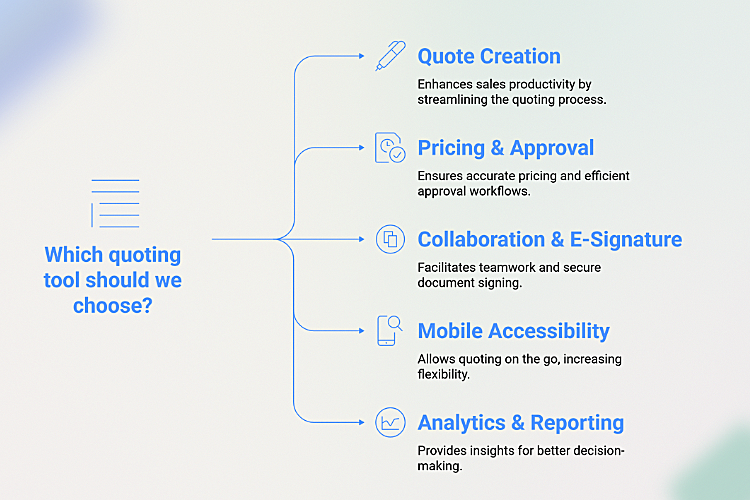
Once you’ve mapped your strategic needs, you can assess specific features. When choosing a quoting tool, these are the core capabilities that deliver the most significant impact on efficiency and revenue.
Quote Creation and Sales Productivity
The software should make it incredibly simple for reps to build complex quotes quickly and accurately.
- Guided Selling: Rules-based item entry that prevents incompatible product combinations.
- Bulk Actions: The ability to apply discounts, terms, or shipping rules across multiple line items at once.
- Content Library: Pre-approved snippets for SOWs, service descriptions, and legal terms that reps can pull in instantly.
- Branded Templates: A library of professional, brand-locked templates that ensure consistency.
Pricing, Margin, and Approval Workflows
This is where you balance speed with control. The right system empowers reps to move fast while protecting your profitability. Look for rule-driven pricing for volume or customer tiers, clear margin visibility at both the line-item and overall quote level, and automated approval workflows that route deals to the right people based on predefined rules (e.g., discount percentage, deal size, or product family).
Collaboration and E-Signature
Modern deals involve multiple stakeholders on both sides. Your quoting platform should be a collaborative hub. Features like in-quote commenting, @mentions, and a full version history keep internal teams aligned. For the customer, interactive web quotes combined with secure e-signature and acceptance capture accelerate the closing process dramatically.
Industry-Specific Quoting Solutions
While the core needs are similar, certain industries have unique challenges that require specialized quoting solutions.
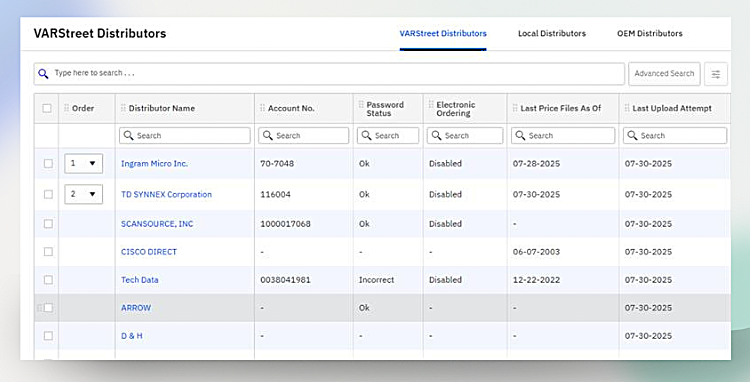
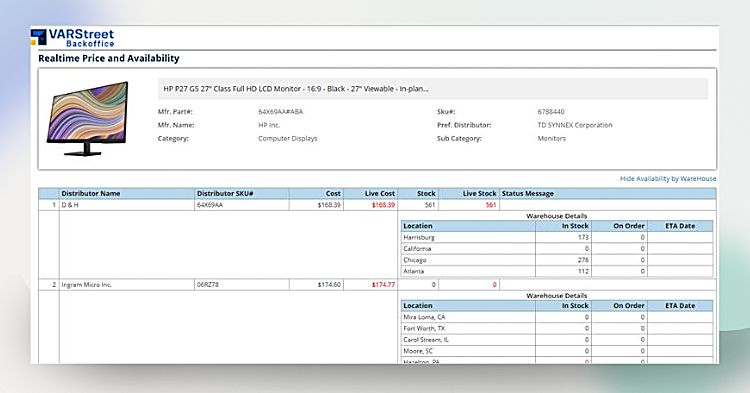
- For VARs & IT Resellers: The absolute must-have is distributor connectivity. Real-time cost and availability feeds from multiple suppliers are essential to protect razor-thin margins and ensure you’re quoting products you can actually deliver. The system should also intelligently suggest compatible accessories and warranties to increase the average deal size.
- For Manufacturing & Distribution: Look for capabilities to manage complex kits and bundles, customer-specific contracts, and real-time inventory levels. The software should reflect warehouse realities, including shipping and potential split deliveries.
- For Enterprise Software/SaaS: The focus is on managing different editions, add-ons, and usage-based pricing. The platform must also support complex renewal and expansion motions and be able to attach security and legal documentation seamlessly.
Mobile Accessibility
- Mobile quoting apps for field sales: Mobile quoting apps empower sales reps to generate, customize, and send quotes directly from their smartphones or tablets. This ensures faster responses during client meetings and improves overall customer engagement.
- Offline quoting capabilities: Offline quoting allows sales teams to create and edit quotes even without internet connectivity. Once back online, the system syncs automatically, ensuring no delays or missed opportunities in areas with poor connectivity.
Analytics & Reporting
- KPIs: Quoting software provides sales leaders with visibility into key performance indicators (KPIs) such as how many quotes convert to deals, how long approvals take, and the overall duration of the quote-to-cash cycle. These metrics help identify bottlenecks and measure sales efficiency.
- Forecasting insights: By analyzing historical quoting data, sales leaders can forecast future revenue, anticipate demand, and make data-driven decisions. This enables better resource allocation, pricing strategies, and sales planning.
Read the blog—Quoting Software: Driving Efficiency and Profitability for VARs
Your Quoting Software Comparison Checklist
Use this list of questions during demos and trials to cut through the sales pitch and find the right partner.
- Can you show me, live, how long it takes a new rep to create a typical quote for my business?
- How much control do we have over templates? What can be locked versus what can be edited by a sales rep?
- How does the system determine the source of truth for pricing (list vs. contract vs. customer-specific)?
- What kind of margin and discount guardrails can we build, and how are approvals routed?
- What does the buyer’s experience look like with an interactive web quote?
- How deep are your native integrations with our CRM and ERP systems?
- What out-of-the-box analytics do you provide for tracking conversion rates, cycle times, and approval bottlenecks?
- How easy is it for an admin to update pricing rules or templates without needing IT support?
- What does your typical implementation and onboarding process look like?
- What is on your product roadmap for the next 6-12 months?
- Can it handle your growing catalog size and team size? How does it perform with thousands of SKUs or multiple distributors?
Common Mistakes B2B Sales Leaders Make When Choosing Quoting Software
Choosing based only on price
Many sales leaders focus solely on upfront licensing costs instead of evaluating the long-term value the solution delivers. A cheaper tool may lack critical features like automation or integrations, which can cost more in lost efficiency.
Ignoring integration capabilities
Quoting software that doesn’t integrate with CRM, ERP, or eCommerce platforms often creates data silos and workflow disruptions. This forces sales reps to duplicate data entry, increasing errors and slowing down the process.
Not involving sales reps in the decision-making
Sales leaders sometimes make purchasing decisions without gathering input from frontline users. Since reps are the ones creating and sending quotes daily, their feedback on usability and efficiency is critical.
Underestimating scalability requirements
Businesses often choose quoting software that meets immediate needs but fails as the team or catalog grows. Limited scalability leads to performance bottlenecks, slower quote generation, and higher costs for switching tools later.
Overlooking vendor support quality
Even the best quoting software can fall short without reliable vendor support during onboarding, troubleshooting, or upgrades. Poor support leads to downtime, frustrated users, and slower adoption.
Quoting Software ROI: How to Measure Success?
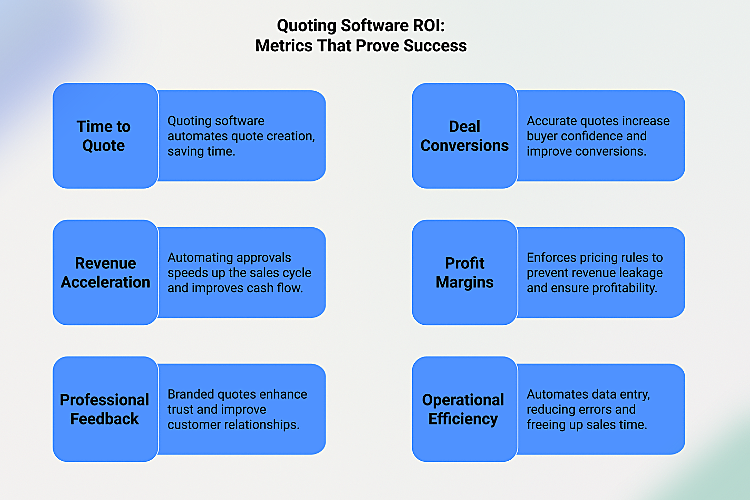
Time to Quote
Quoting software significantly cuts down the time needed to prepare, customize, and send quotes. Instead of hours or days, quotes can be generated in minutes with automated product catalogs and pricing rules. This agility helps sales teams respond faster and stay ahead of competitors.
Impact on deal conversions
Accurate, professional, and timely quotes increase buyer confidence and improve conversion rates. With features like real-time pricing and automated approvals, sales teams can avoid delays that often cause customers to switch vendors.
Revenue Acceleration
By automating approvals, integrating with billing, and enabling eSignatures, quoting software reduces bottlenecks in the sales cycle. This means deals close faster, payments are received sooner, and cash flow improves.
Profit Margins
Quoting tools enforce pre-set pricing rules, margin protection, and discount thresholds to prevent revenue leakage. Sales reps get visibility into profit margins in real-time, ensuring every deal stays profitable. This disciplined approach balances competitive pricing with long-term profitability.
Feedback on professional quotes
Customers value speed, accuracy, and transparency in B2B buying. Branded, clear, and well-structured quotes not only leave a professional impression but also simplify decision-making. Faster responses enhance trust, leading to better customer experiences and stronger relationships.
Operational Efficiency
Manual quote creation often leads to mistakes in pricing, product availability, or terms. Quoting software eliminates these risks by automating data entry and syncing with ERP/CRM systems. As a result, teams spend less time fixing errors and more time selling.
Conclusion
Choosing the right quoting software is not just about features, it’s about finding a solution that fits your sales process, supports your team, and makes life easier for your customers. The right tool will save time, reduce errors, and give you better control over pricing and margins, while also improving the buyer’s experience. By carefully comparing your options and keeping long-term goals in mind, you can pick a quoting solution that drives efficiency, boosts sales, and builds stronger customer relationships.
Tired of slow, error-prone quoting? VARStreet has you covered! Check out our Sales Quoting Software and start winning more deals with less effort