ERP-eCommerce Sync Design: What to Sync vs Not Sync
Table of Content
You log into your ERP at 8:30 am Monday. Inventory shows 4 Lenovo ThinkPads from Ingram Micro. You open your B2B store dashboard. It shows 24.
A school district ordered 18 Lenovo ThinkPads over the weekend. Your store accepted the order. Your fulfillment team finds out at 10:15, when the buyer’s procurement officer is on the phone asking about the shipping date.
Nobody made a mistake. The Ingram feed runs nightly. The ERP-to-store sync runs every six hours. Between Friday afternoon and Sunday morning, Ingram pulled 20 of those units to fill another reseller’s order. Your store had no idea.
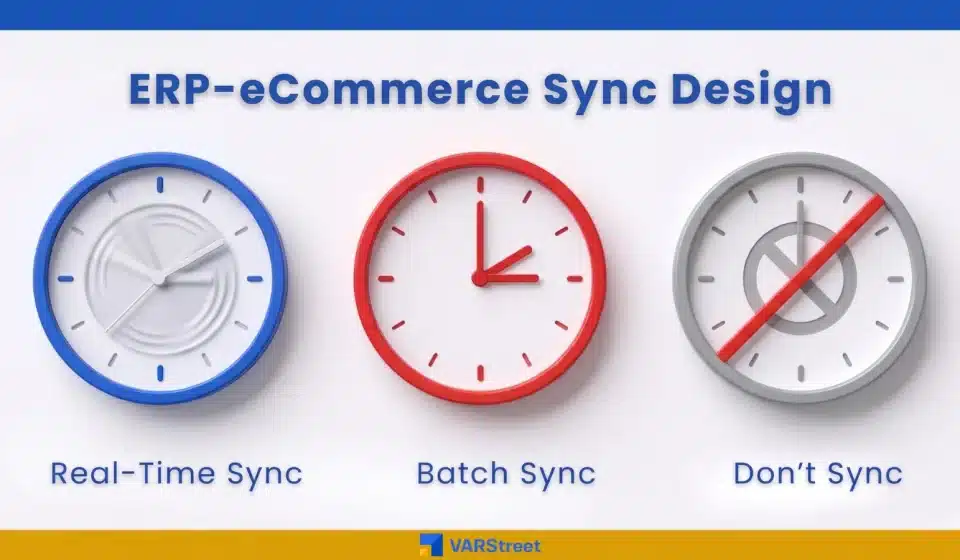
This is what bad ERP ecommerce integration looks like. Not a system that’s down. A system running exactly as designed, just designed badly. Every Value-Added Reseller (VAR) and Managed Service Provider (MSP) has to make the same call on every data field. Real-time, batch or not at all.
Key Takeaways:
- Not every field deserves a real-time sync. Inventory and live distributor pricing must move instantly. Product descriptions and tax tables can wait for a nightly batch.
- Over-syncing is just as costly as under-syncing. Constant webhooks burn API limits, slow your stack and corrupt records when two systems overwrite each other.
- For VARs, real-time inventory sync is non-negotiable. Selling 18 units when only 4 sit at Ingram Micro turns one click into three days of cleanup.
- For MSPs, contract pricing and customer-specific service rates matter most. A mispriced recurring service line bleeds margin every month until renewal.
- Internal cost data, vendor invoices, payroll and markup logic should stay inside the ERP. Pushing them to your store poses a security risk and offers nothing in return.
Why “Sync Everything” Breaks ERP eCommerce Integration
The instinct is always the same. Connect both systems. Sync every field. Let the platform sort it out. It feels safe. It is not.
Real-time syncing across every field has three costs.
Performance drops. Every product attribute or tax code change triggers a webhook. Small daily changes turn into thousands of API calls per hour. Records are corrupted because when two systems both treat themselves as the source of truth, the last write wins. And every additional sync is one more thing that can break overnight.
Gartner finds that 55% to 75% of ERP projects fail to meet their original objectives, with integration scope a top reason.
Smart ERP integration best practices start with one question. What breaks if this field is wrong by four hours? Nothing means- batch. “We oversold and refunded a customer” means- real-time. “It shouldn’t even leave the ERP” means- kill the sync. Read on and we will explain more.
The Three Sync Tiers Every Reseller Needs
Every field of data sync between ERP and e-commerce falls into one of three buckets. You must sort them correctly to avoid feeling integration like a fire drill.
Tier 1: Real-Time Sync
This is the data where even minutes matter.
Inventory leads the list. Real-time inventory sync in eCommerce has to come from a live feed, not a nightly export. For a VAR pulling stock from Ingram, TD Synnex and D&H, each distributor connection feeds the ERP and the storefront together. Stock is reserved at checkout, so the last available item cannot be sold to two buyers at the same time.
Distributor pricing is next. As we cover in How VARStreet Helps VARs Manage Vendor Pricing Volatility in Real Time, price files can shift two or three times a week on hardware. Order data is the third. When a buyer places an order, it has to land in your ERP within minutes. Status and shipment updates flow back the same way.
Tier 2: Batch Sync
This is the data where four hours late costs you nothing.
Product master data fits here. Names, descriptions, specifications, spec sheets. Customer records too: account registrations, billing addresses, tax exemption documents. So do tax tables, freight rules and shipping zones. A nightly sync works here, with a manual override for the rare moment something urgent breaks.
Tier 3: Don’t Sync at All
Some data should live in exactly one system.
Internal cost is the clearest example. Your ERP knows what you actually pay ScanSource per unit. Your store does not need that number. If a buyer ever sees it through a misconfigured field, you cannot un-see it. Vendor invoices, accounts payable, payroll, HR records and your internal markup formulas belong in the same vault. The output, which is the customer-facing price, syncs. The math behind it does not.
Where VARs and MSPs Differ on Sync Priorities
Treating VARs and MSPs as the same audience for B2B system integration is the most common ERP-ecommerce mistake.
A VAR is hardware-led and deal-based. Hardware reseller margins in North America typically run 5% to 15%, much thinner than the 15% to 35% hardware-maker gross margin range quoted publicly. That floor leaves no room for a stale price. The VAR priority list is short: inventory live, distributor price live, and order to ERP live.
An MSP runs on recurring service contracts. A mispriced laptop deal hurts on one invoice. A mispriced managed-services contract costs money every month until renewal, and most contract terms run for twelve to thirty-six months. The MSP priority is customer-specific contract pricing, account credit limits and approved-product catalogs. The sync design has to follow the business model.
How a Platform Can Configure the Sync Tiers for You
A platform specifically meant for VARs and MSPs is a great help here. When it onboards a reseller, the platform comes pre-configured with the sync tiers most VARs and MSPs need. Inventory and pricing from your signed IT and office supply distributors run through live feeds. When stock moves at Ingram or TD Synnex, your store sees it. The aggregated catalog handles product master data on a daily refresh, sourced from product content solutions like Etilize, IceCat and the HP Content Syndication Program. Orders flow into your ERP through pre-built connectors for NetSuite, Microsoft Dynamics, SAP Business One and QuickBooks. Internal cost, accounts payable and payroll stay in the ERP, untouched.
VARStreet’s Product Manager puts it simply: “For NetSuite, we configure bi-directional sync in days, not months. Orders move to the ERP within minutes. Status flows back hourly. Internal cost and AP data are excluded by default. Most resellers come to us with custom scripts that break on every ERP release. We replace those with a connector we maintain.”
Before and After: What Actually Changes
| What You Do Today | The Problem It Creates | What Changes With the VARs and MSPs Specialized Platform |
|---|---|---|
| Run a nightly distributor inventory export, then sync the ERP to store every six hours. | Stock counts drift by up to 30 hours over a weekend. Overselling becomes routine. | Live feeds from your signed distributors update both your ERP and your store the moment stock changes. |
| Sync every product field in real time to “be safe.” | API limits hit by mid-afternoon. Webhook failures pile up overnight. Both systems slow down. | Real time stays real time. Catalog content batches nightly. Internal data stays in the ERP. |
| Custom NetSuite or Dynamics scripts that break on every ERP release. | Developer hours every quarter are just keeping the integration alive. New ERP versions delay rollouts. | Pre-built bi-directional connectors for NetSuite, Microsoft Dynamics, SAP Business One, and QuickBooks, maintained by the platform across releases. |
| Reconcile inventory and order data manually before the month-end close. | Three days of finance team time per month. Discrepancies get written off rather than fixed. | One source of truth for inventory and orders. Month-end reconciliation is automated, not manual. |
Run This Sync Audit Today
Open a spreadsheet. List every field your ERP and ecommerce store both touch. For each one, note the source of truth, the sync direction and the frequency.
Then ask one question of every line: if this field is wrong by four hours, what breaks? “Nothing” means batch it. “We lose a customer or ship at a loss” means real time. “It shouldn’t be in the store at all” means kill the sync.
The audit takes about ninety minutes for a mid-size VAR. It almost always reveals at least one field syncing in real time when it shouldn’t.
Getting Started With VARStreet
Real-time inventory and pricing from your signed distributors. Pre-built ERP connectors. One source of truth for orders. Most resellers run through the right sync tiers within days of onboarding.
Book a Demo to see how your existing distributor connections, ERP and ecommerce store would slot into VARStreet. For more on how distributor pricing volatility hits the same data your store relies on, see Working With Multiple Distributors? Here’s What Happens When Your Quoting Tool Can’t Keep Up.
FAQs
What ERP data should never sync to my e-commerce store?
Internal cost data, accounts payable, vendor invoices, payroll, HR records and internal markup logic. Pushing any of these to a customer-facing system creates a security risk with no operational gain.
What is the difference between real-time and batch sync in ERP ecommerce integration?
Real-time syncs move data the moment a record changes, usually through a webhook. Batch syncs run on a schedule, hourly, every six hours, or nightly. Real-time fits inventory, distributor pricing and orders. Batch fits product descriptions, tax tables and customer master data.
How does ERP-eCommerce integration work differently for VARs versus MSPs?
VARs prioritize live inventory and distributor pricing because hardware margins are thin and overselling is fatal. MSPs prioritize contract pricing and credit limits because a mispriced recurring service line bleeds margin every month until renewal.
How often should inventory sync between ERP and an e-commerce store?
For VARs sourcing from distributors, inventory should sync in real time, not on a schedule. A live feed from each signed distributor into your ERP and store is the only cadence that prevents weekend overselling.
What is the most common reason ERP ecommerce integrations fail?
Trying to sync everything in real time. Over-syncing burns API limits, corrupts records and turns small distributor changes into thousands of webhook events. Sort fields into three sync tiers before integration goes live.
Pragya Bhardwaj
Pragya Bhardwaj is a seasoned B2B content writer with a strong background in SaaS and digital commerce. She specializes in creating clear, engaging, and search-optimized content that helps businesses connect with their audiences and build authority online. With experience across blogs, whitepapers, eBooks and website copy, Pragya brings both strategy and storytelling to every piece she writes. Editorial Policy
Read More