Your first real order after launch comes from a school district. Twenty-five HP laptops, net-30 terms, a signed contract price already on file.
Checkout asks for a credit card.
The buyer emails the order to your rep instead, the way they have for six years.
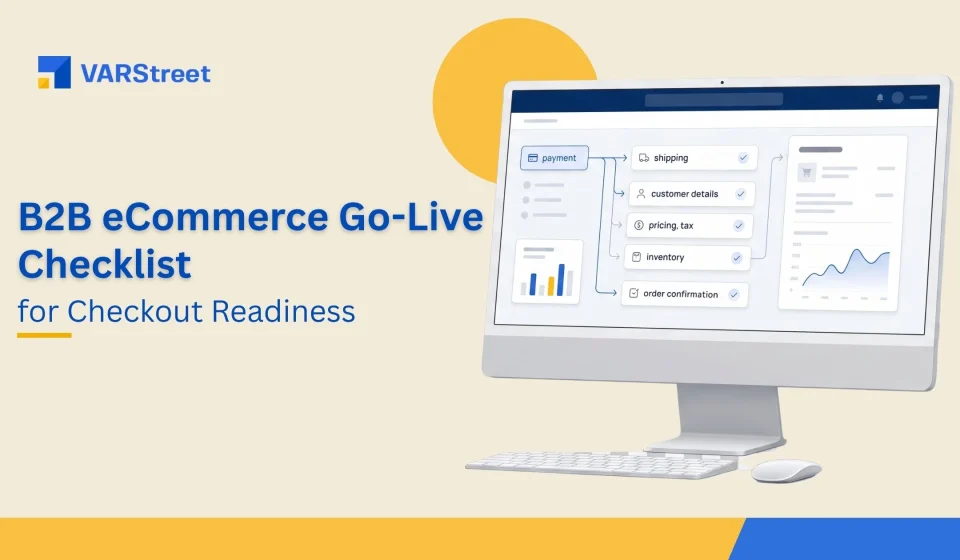
Every item on your eCommerce launch checklist passed. The cart worked. Payment worked. Shipping worked. What did not work was checkout for that specific customer, and that is a different test entirely. Most launch checklists confirm that checkout functions. In B2B it almost always functions, and the order still fails, because the paths that break only exist once a real account logs in.
Key Takeaways:
A B2B checkout rarely fails at payment. It fails at contract pricing, purchase order terms, tax exemption and approval routing.
A generic test account cannot find these faults. Every path that breaks is tied to a specific customer record.
Test with your three most complicated real customers, not your simplest one.
Value-Added Resellers (VARs) and Managed Service Providers (MSPs) should test different paths. Backorder and split shipment for one, recurring billing and renewal for the other.
Decide your rollback rule before launch day, in writing, or you will decide it while a customer is waiting.
Why do B2B checkouts fail while B2C checkouts do not?
Most published launch checklists were written for a store where a stranger arrives, adds an item and pays by card. That flow has maybe six failure points, and a team can test all of them in an afternoon. A B2B checkout has a different shape. Almost nothing about it is visible until someone logs in.
What only exists after login
Contract pricing applies after authentication. Credit limits and payment terms are attached to an account, not a session. Tax exemption certificates sit on a customer record. Approval chains route to named people inside the buyer’s organization. PunchOut carts return to a procurement system your team cannot see, which is why PunchOut deserves its own testing pass rather than a single row on a list.
None of that exists for the anonymous test user your team has been clicking through for three weeks.
This is why B2B launches tend to break after go-live rather than before. Research cited from the Forrester Wave for B2B commerce points to uncoordinated handoffs between data, design and integration work as a leading cause of post-launch revenue loss, and one analysis of replatforming post-mortems found 73% of root causes traced to decisions made before deployment.
To be fair to the standard checklist, it is not wrong. Page speed, SSL, payment gateway and mobile rendering all matter, and you should check them. They are just the items least likely to fail, and they consume the testing time your account-specific paths need.
How many checkout paths do you actually have?
A B2C checkout has one path. A B2B checkout has one path per customer type, and you have more customer types than you think.
Count them properly. A commercial account on standard pricing. A commercial account on a negotiated price list. A tax-exempt school or municipality. A government buyer arriving through PunchOut. An account on credit hold. A buyer whose orders need a manager’s approval above a threshold.
That is six paths before you have accounted for a single distributor or product. Test one of them and you have tested roughly a sixth of your checkout.
Most teams test the first one, because it is the account their developer created on day one.
What belongs on your eCommerce go-live checklist
Run every row below against a real customer account, using real contract terms. Not a sandbox record with round numbers.
What to Test
The Failure It Catches
Test With
Contract pricing after login
Buyer sees list price, calls your rep, stops using the store
Your three largest contract accounts
Purchase order as a payment method
Net-terms buyers cannot check out at all
An account with net-30 or net-60
Credit limit and hold behavior
Order accepted past the limit, or blocked without explanation
An account near its limit
Tax exemption certificate
Tax charged to an exempt buyer, invoice rejected
A school, hospital or government account
Approval workflow routing
Order sits unapproved because it routed to a leaver
A buyer with a multi-step chain
PunchOut cart return
Cart never reaches the requisition; buyer blames you
A live Ariba or Coupa buyer
Partial availability and backorder
Store promises stock it does not have
A multi-line order with one short item
Freight and delivery rules
Quoted freight does not match the invoice
An oversized or multi-warehouse order
The tax row deserves the worked example, because it is the one nobody remembers until an invoice comes back.
A reseller launched on a Monday. On Wednesday, a school district ordered 25 HP ProBooks through the new store, roughly $18,000 of hardware sourced through D&H. The store applied 8.25% sales tax, about $1,485, to a customer whose exemption certificate had been on file since 2019.
Accounts payable rejected the invoice. The order stalled six days while finance reissued it. At the 5% to 15% margin typical of hardware resale, the deal itself was worth somewhere near $1,400 in gross profit, so the correction cost more staff time than the order earned.
The certificate was in the old system. Nobody had listed certificate migration as a checkout test, because it did not look like a checkout item.
The MSP version of this list looks different. Recurring contract lines, renewal dates and prorated billing carry the risk, and the test that matters is whether a mid-term addition bills correctly on the next cycle rather than at full rate. A VAR finds its checkout faults on launch week. An MSP finds them on the first billing run.
Launch day sequence and the rollback rule
Go-live testing does not end when the site is live. The first 72 hours are the real test, and they need a plan written before anyone flips the switch.
Launch to a segment, not to everyone.
Enable three or four friendly accounts first, ones who will phone you rather than quietly go back to email. Watch their first orders end to end, including the invoice.
Watch the order, not the dashboard.
For every order in the first two days, compare four things: what the customer saw, what the store recorded, what your enterprise resource planning system received and what the invoice said. Dashboards report that an order exists. They do not report that it is correct.
Write the rollback rule before launch.
Decide in advance what condition sends you back to the old process, who makes that call and how customers are told. Something like: any pricing error reaching a customer, or any two orders that fail to reach the ERP, pauses new account enablement until it is fixed.
That rule is not pessimism. It is what lets you launch on schedule, because the team stops arguing about whether the site is perfect and starts agreeing on what “safe enough” means.
The rule also has to name a person. A condition with no owner turns into a group discussion at the worst possible moment, usually with a customer on hold. One name, written down, can pause enablement without calling a meeting.
Keep the old path open for two weeks.
Your buyers have muscle memory. A customer who hits one broken checkout and cannot fall back to email does not try again next week. They go back to phoning your rep, and winning them onto the store a second time is harder than the first.
How VARStreet handles checkout readiness
Run the same list against us.
Contract pricing, credit limits, payment terms and tax exemption all live on the customer record, so what a buyer sees after login is what their agreement says. Cost from your signed IT and office supply distributors is live, so availability shown at checkout reflects what is actually sourceable rather than a figure loaded overnight.
Purchase order checkout, credit holds and approval routing are configured per account rather than bolted on, which means the net-30 buyer from the opening scene checks out on launch morning instead of emailing your rep.
PunchOut into Ariba, Coupa and Oracle is native, so the cart returns to the buyer’s requisition without a third-party service in the middle. Tax is handled through Avalara with rules you can override. Our Product Manager puts it simply: “Teams test the checkout. The orders that fail belong to customers nobody tested as a customer.”
What You Do Today
The Problem
What Changes
Test checkout with a generic account
Every account-specific path goes untested
Test rows run against real contract accounts
Launch to all customers at once
Faults reach your largest buyers
Segmented launch, friendly accounts first
Watch the dashboard for errors
Orders that exist but are wrong look fine
Order, ERP record and invoice compared line by line
Decide rollback while a customer waits
Slow, contested calls under pressure
Rollback condition agreed in writing before launch
What belongs on a B2B eCommerce go-live checklist that a B2C one leaves out?
Contract pricing after login, purchase order payment terms, credit limits, tax exemption certificates, approval routing and PunchOut cart return. All are tied to a customer record, so an anonymous test never reaches them.
How long should B2B checkout testing take before launch?
Two to three weeks for most resellers, with at least one week spent on real customer accounts rather than test records.
Should you launch to all customers at once?
No. Enable three or four accounts who will call you when something breaks, watch their orders through to invoice, then widen.
What is the most common checkout readiness failure?
Pricing that does not match the signed agreement, usually because the customer record migrated without its price list.
How long should the old ordering process stay open after go-live?
Around two weeks. Buyers have years of habit, and one broken checkout with no fallback sends them back to email for months.
Pragya Bhardwaj is a seasoned B2B content writer with a strong background in SaaS and digital commerce. She specializes in creating clear, engaging, and search-optimized content that helps businesses connect with their audiences and build authority online. With experience across blogs, whitepapers, eBooks and website copy, Pragya brings both strategy and storytelling to every piece she writes.
Editorial Policy